
The Business Central integration built to automate fulfillment.
DropStream connects Business Central to the warehouses and 3PLs that fulfill its orders. Built for merchants and 3PLs, it applies your rules and syncs shipments back.
A Business Central integration you can count on.
Business Central is your system of record. When orders need custom handling, the built-in connectors leave your team to do it manually, and finance and operations end up with different numbers. DropStream automates your custom workflows and keeps Business Central accurate, backed by 15+ years connecting ecommerce and fulfillment systems.

99.98% platform uptime
Live every day of the year, with no blackout periods.

ISO 27001 certified
Role-based access, audit trails, and encryption for your ERP data.

15+ years, founder owned
Privately owned since 2010. Loyal to customers, not investors.

Built for custom workflows
Routing, splits, holds, and kits run as rules your team can change.
Connect Business Central once. Automate everything after the order.
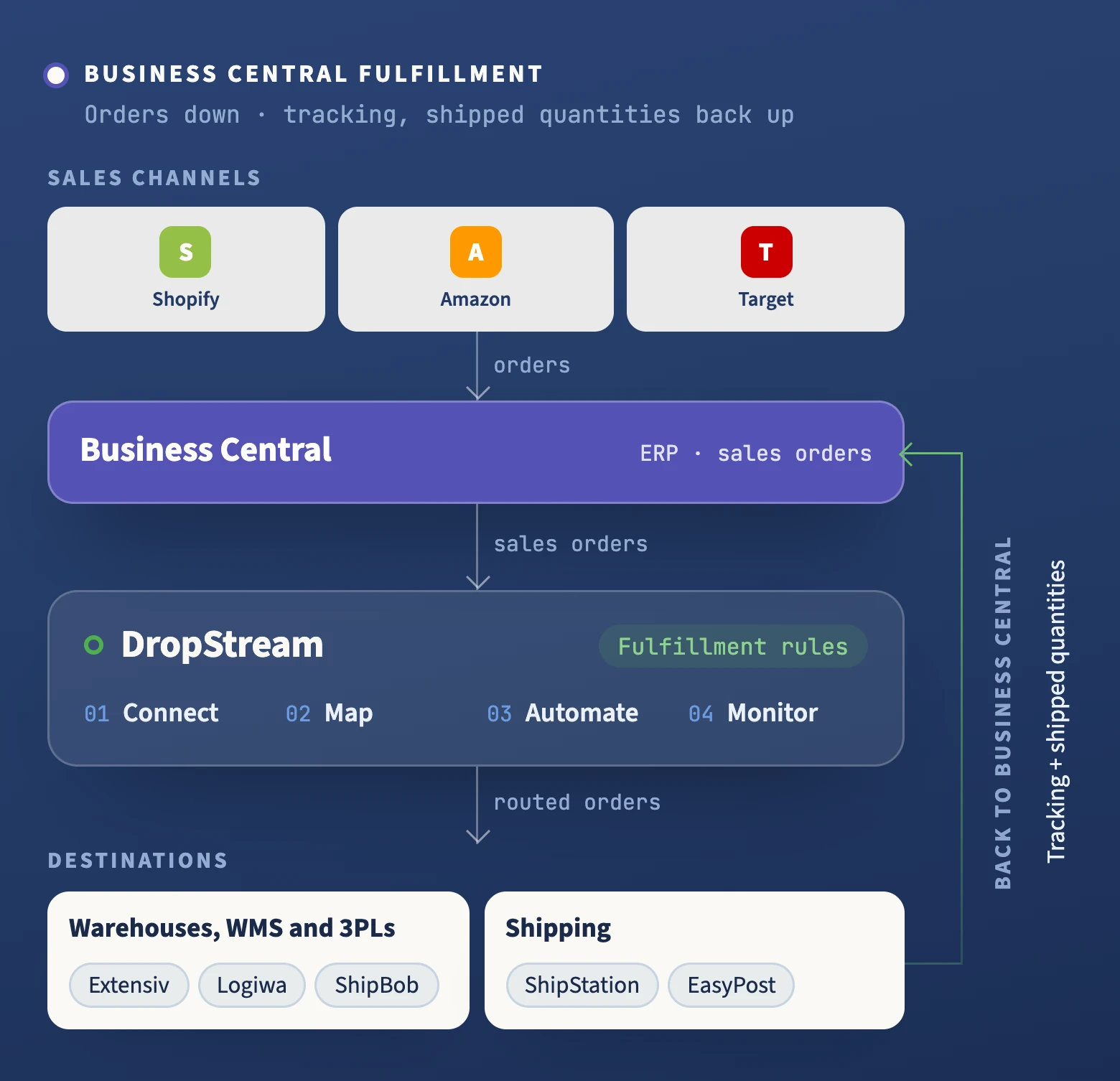
Business Central holds the order. The warehouses, 3PLs, and carriers that fulfill it sit outside it. DropStream connects them and applies your fulfillment rules before each order goes out, so your data keeps flowing.
What Business Central connects to:
- Warehouses and 3PLs: Orders go to the WMS or 3PL that picks and packs them, including Extensiv, Logiwa, Deposco, Manhattan, VeraCore, and ShipBob.
- Shipping platforms: Ship from your own warehouse? Orders go to ShipStation or EasyPost for labels, and tracking comes back.
- Finance records: Tracking and shipped quantities post back to the order line by line, partial shipments included, so finance and operations see the same numbers.
- Custom systems: No pre-built connector for a system you run? We build a custom integration with you, in weeks, not quarters.
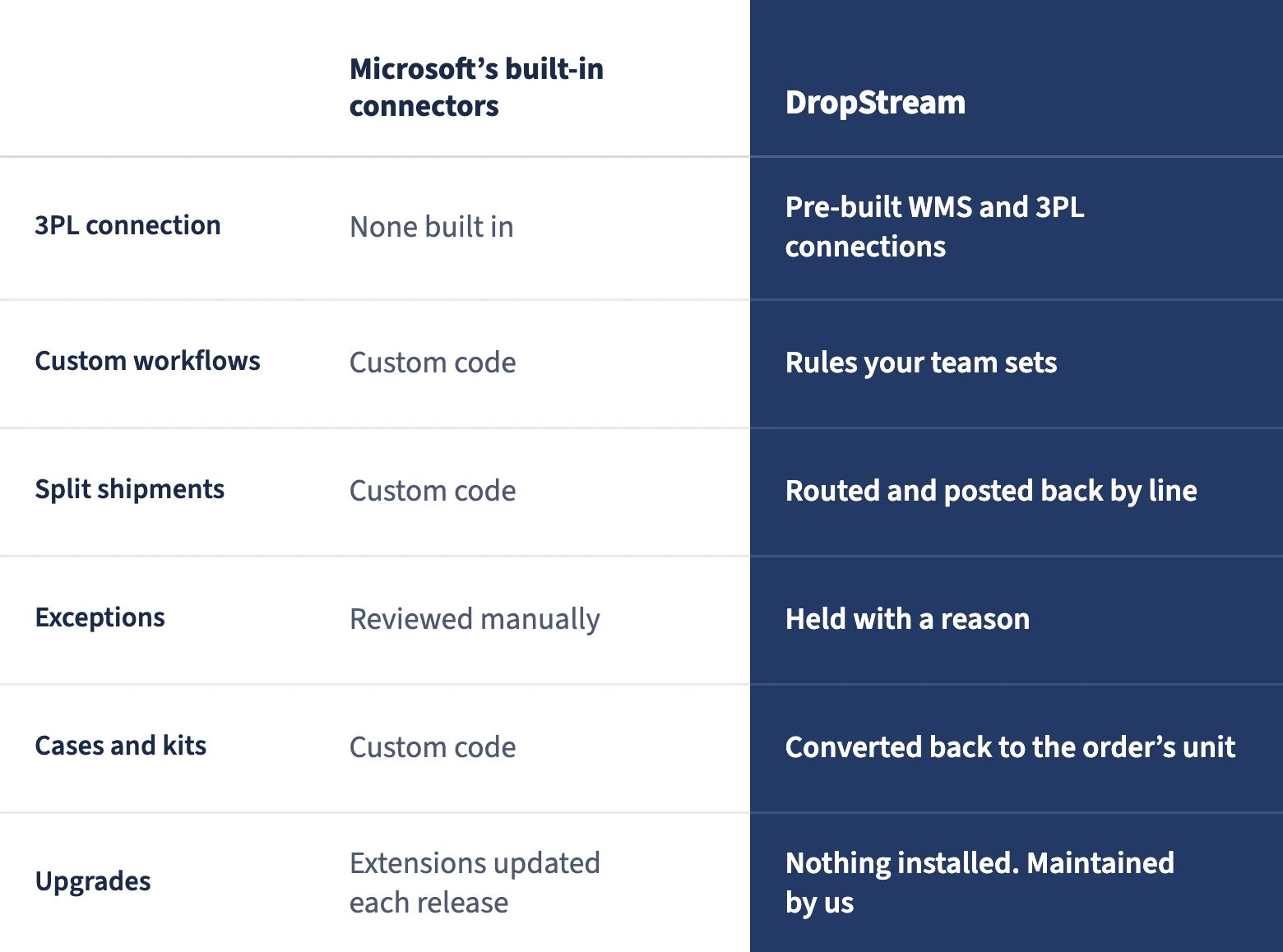
Built-in connectors cover the basics. DropStream covers your custom workflows.
Microsoft’s built-in connectors handle standard syncs. When fulfillment needs custom rules or a 3PL, here is how the options compare.
Microsoft’s built-in connectors.
The upside: included, and fine for standard syncs.
The catch: no built-in 3PL connection, and anything custom means custom code.
Build it yourself.
The upside: full control with custom code or an integration platform.
The catch: a project your team maintains every time Business Central updates.
DropStream.
The upside: pre-built 3PL and WMS connections and a rules engine for custom workflows, maintained by us.
Best fit when: you want it live in days, not weeks.
Two sides of Business Central. One flow after the order.
You run Business Central. We automate everything after the order.
You run your business on Business Central. DropStream connects it to the warehouses and 3PLs that ship your orders, and automates the custom workflows in between.
- Your workflows, automated. Routing, splits, holds, and kits run as fulfillment rules your team can change.
- Finance and ops in agreement. Shipped quantities post back to the order line by line, so Business Central matches what actually shipped. Ship quantity settings.
- Grow without a rebuild. Add a 3PL or a second warehouse and change your routing with live changes.
You win the merchant. We keep their orders moving.
Your new merchant runs Business Central. DropStream connects it to your WMS with a pre-built connection, so onboarding never turns into a custom ERP project.
- Onboard in days. Connect and test a new merchant’s Business Central in days, not weeks. Setup guide.
- Rules per merchant, without code. Set each merchant’s routing and holds in the rules engine.
- Every sync monitored. DropStream watches each merchant’s connection and alerts you when an order needs attention.
Custom workflows, built with you.
Your team configures the everyday rules. We build the rest alongside you.
A new 3PL comes on, a kit changes, or a customer’s orders need a hold. Your team updates the rule in DropStream’s rules engine, and the change is live. No code, no rebuild.
When a workflow needs more, we scope it with your team and build it together, in weeks, not quarters. Scoping is never an extra fee.
After launch, you reach the same specialists for support. Founder-led since 2010 and privately owned, DropStream prices on connections: no hidden fees, no peak surcharges, no volume thresholds.

"It’s comforting to know that DropStream is reliable. It just works. It’s been a great asset over the years that adds value to what we offer."

Keep Business Central and your whole stack in sync.
Onboarding and support included · Live in days · 99.98% uptime